ProtoToolProtoTool · Protocol Debugging Lab

Modern Protocol Debugging Workbench for Industrial and IoT Teams

ProtoTool integrates multi-protocol connectivity, specification parsing, plugin extensions, and AI-assisted capabilities into a desktop workstation. Through unified session management and data storage, it helps engineering teams quickly troubleshoot complex network issues and accumulate reusable knowledge assets.

GitHub Stars
1
Total Downloads
22
Latest Version
v0.0.13
Active SessionsProtoTool
  • MQTT · Industrial GatewayStable
  • WebSocket · Real-time MonitoringFluctuating
  • TCP · Historical PlaybackPending

Message Fragment

{
  "device": "sensor-42",
  "latency": "18ms",
  "payload": {
    "status": "online",
    "metrics": ["temperature", "humidity"]
  }
}

Integration Todo

  • · Confirm MQTT exception replay script with QA
  • · Pull latest edge node metrics data
  • · Organize integration daily report and sync to Feishu

Capabilities

Core Capabilities Overview

These capabilities come from real implementations in the ProtoTool main repository, covering multi-protocol debugging, specification parsing, plugin extensions, and data analysis scenarios.

Multi-Protocol Connection Management

Simultaneously manage TCP, UDP, serial port sessions with status monitoring, auto-reconnect, and disconnection recovery.

KPT 1.1 Protocol Editor

Visual protocol editor supporting KPT 1.1 specification for protocol definition, import/export, and repository management.

Intelligent Factor Translation

Built-in HJ212 environmental monitoring factor code parsing and translation with custom factor code table management.

Multi-Dimensional Log System

Backend log management with multi-dimensional filtering, real-time queries, and export to JSON, CSV, Markdown formats.

Database Storage Management

Support for MySQL, Redis, InfluxDB database connections with storage rule configuration and real-time monitoring.

Cross-Platform Experience

Built with Tauri for consistent desktop application experience across Windows, macOS, and Linux.

Screenshots

Software Interface Preview

Intuitively understand ProtoTool's core functional interfaces, from connection management to protocol editing, from log analysis to data storage.

Screenshot coming soon
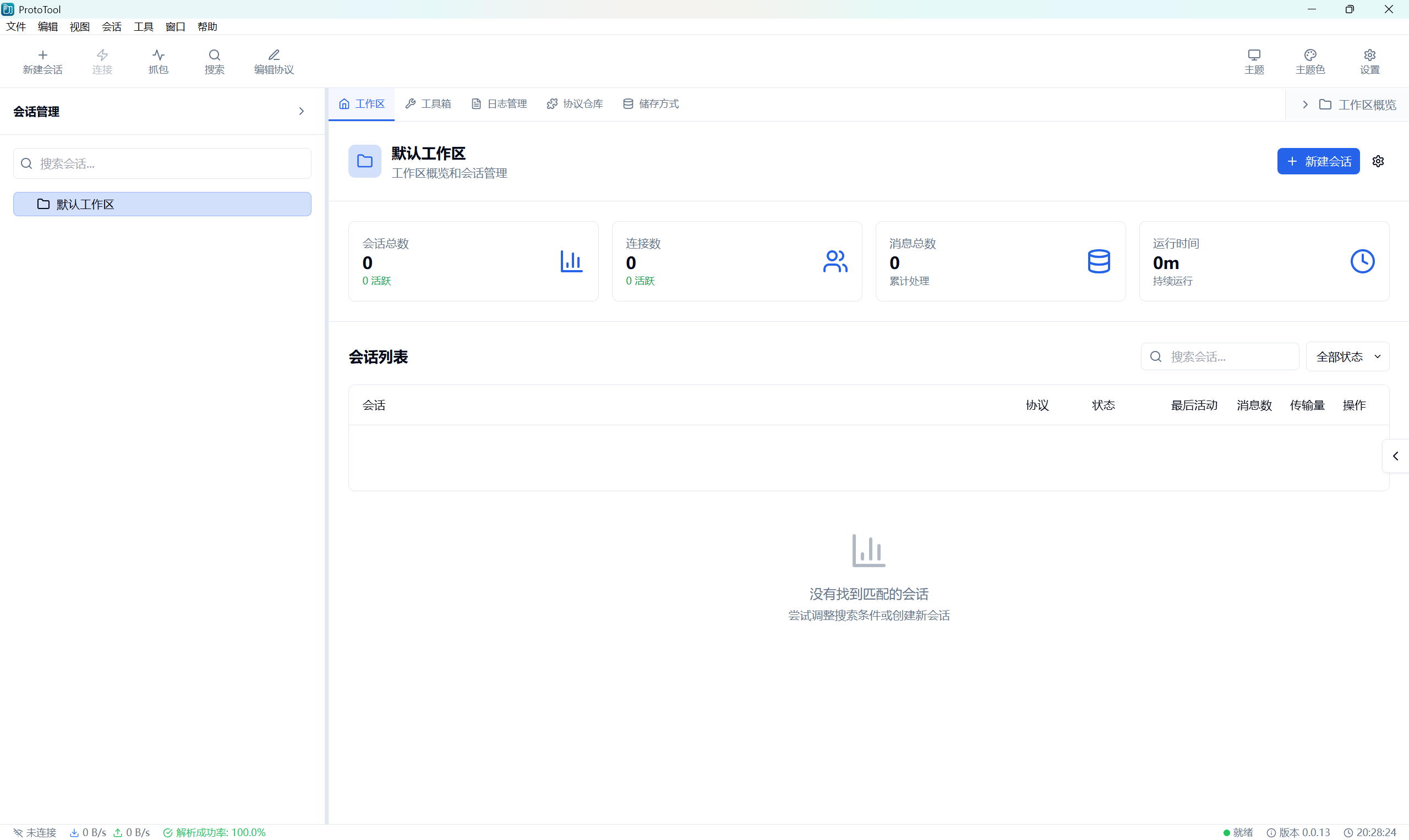
ProtoTool Main Workspace Interface

Main Workspace

Unified workbench interface integrating connection management, message monitoring, and protocol parsing functions.

Screenshot coming soon
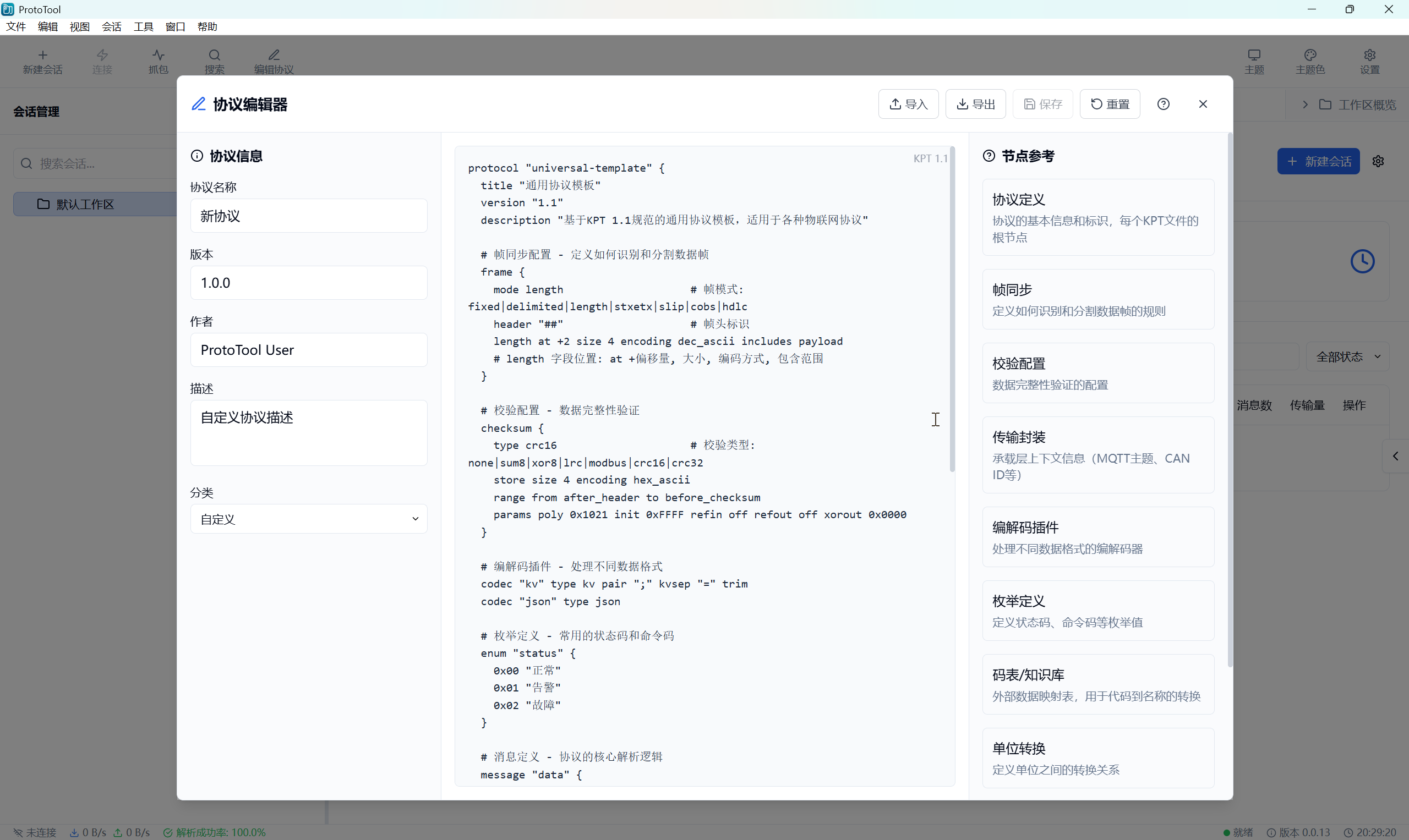
KPT 1.1 Protocol Editor

Protocol Editor

Visual protocol editor supporting KPT 1.1 specification with syntax highlighting and real-time preview.

Screenshot coming soon
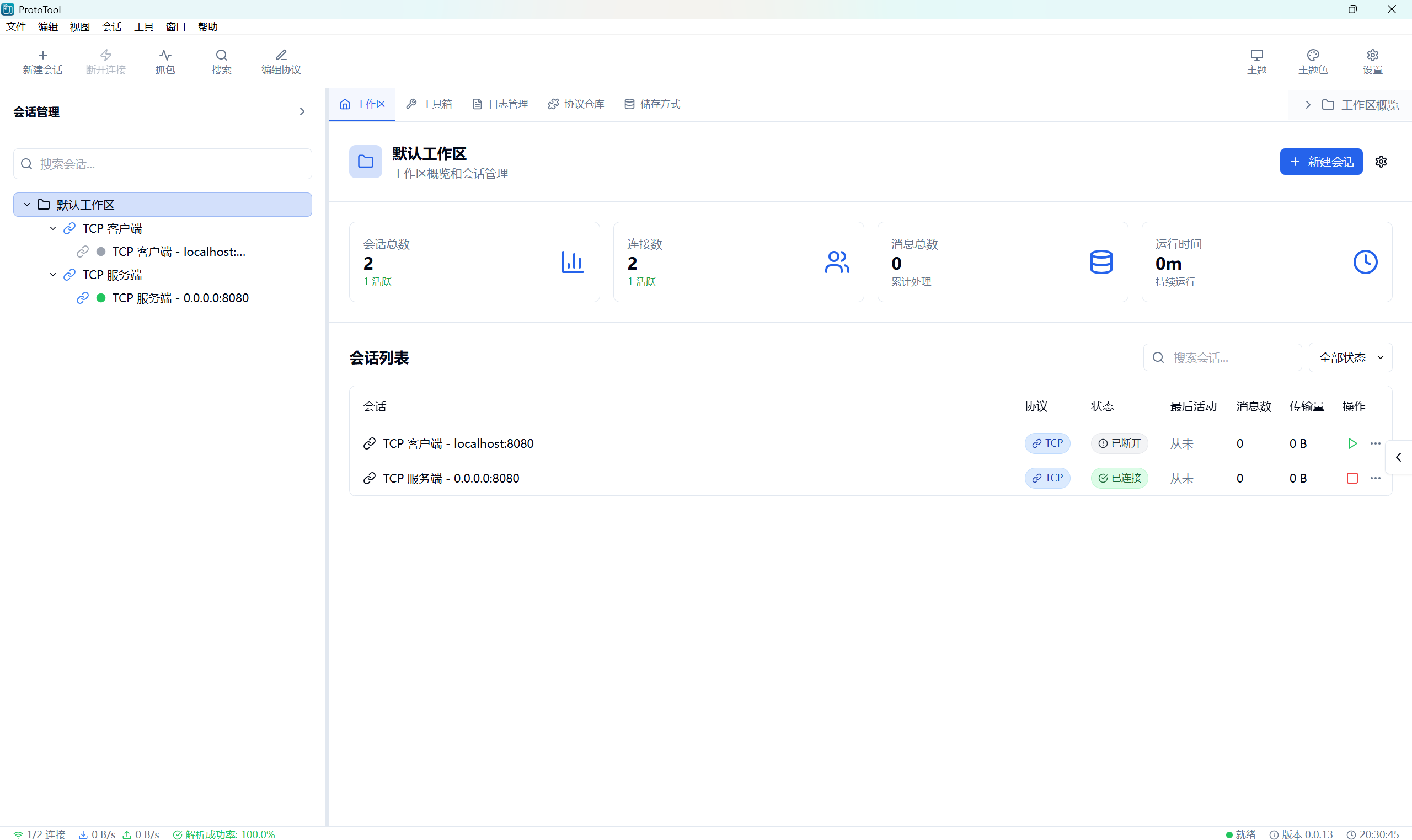
Connection Manager Interface

Connection Manager

Multi-protocol connection management supporting TCP, UDP, serial ports, real-time connection status display and auto-reconnect.

Screenshot coming soon
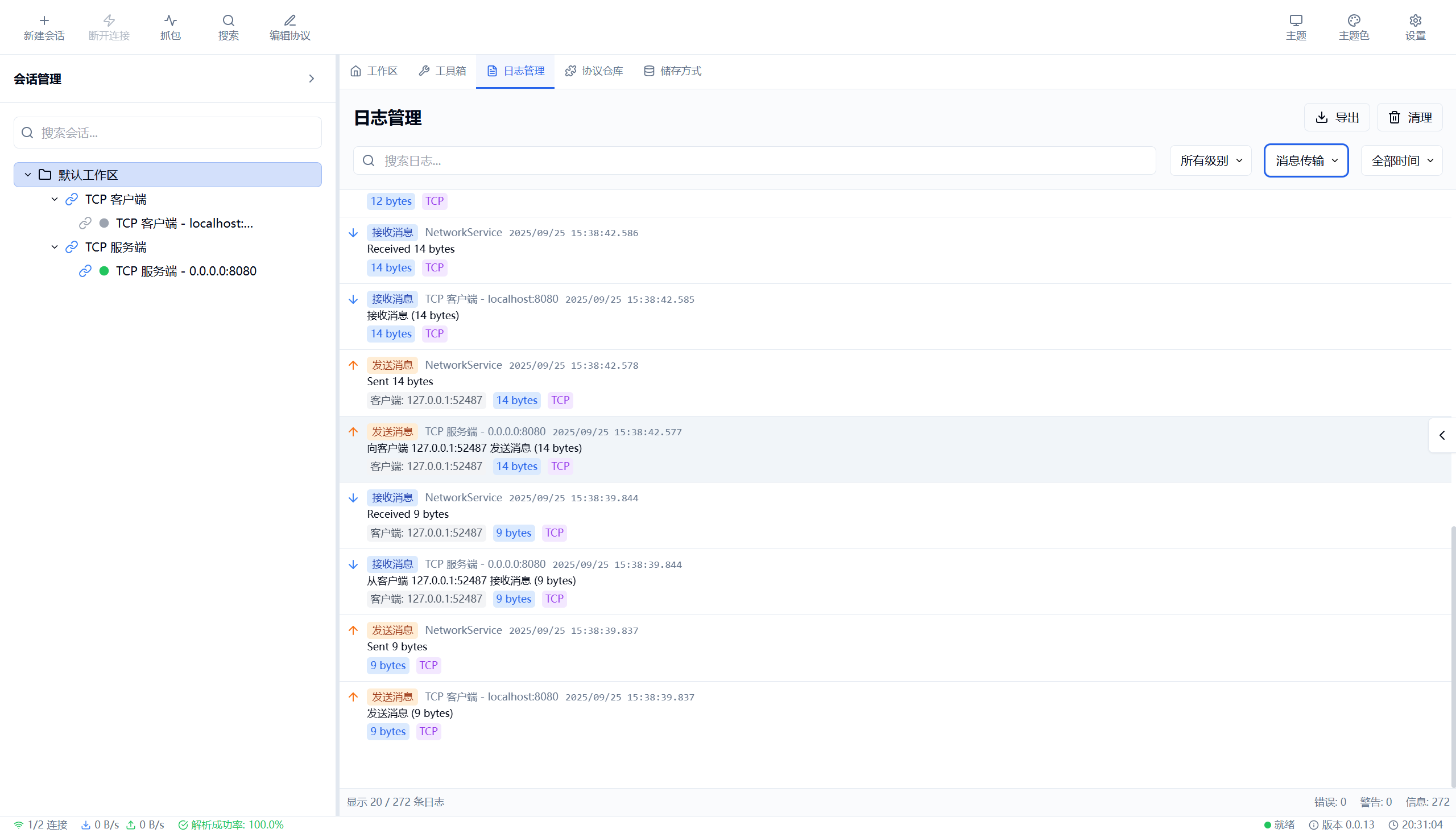
Log Viewer Interface

Log Viewer

Multi-dimensional log filtering and querying, support filtering by session, level, category, exportable in multiple formats.

Screenshot coming soon
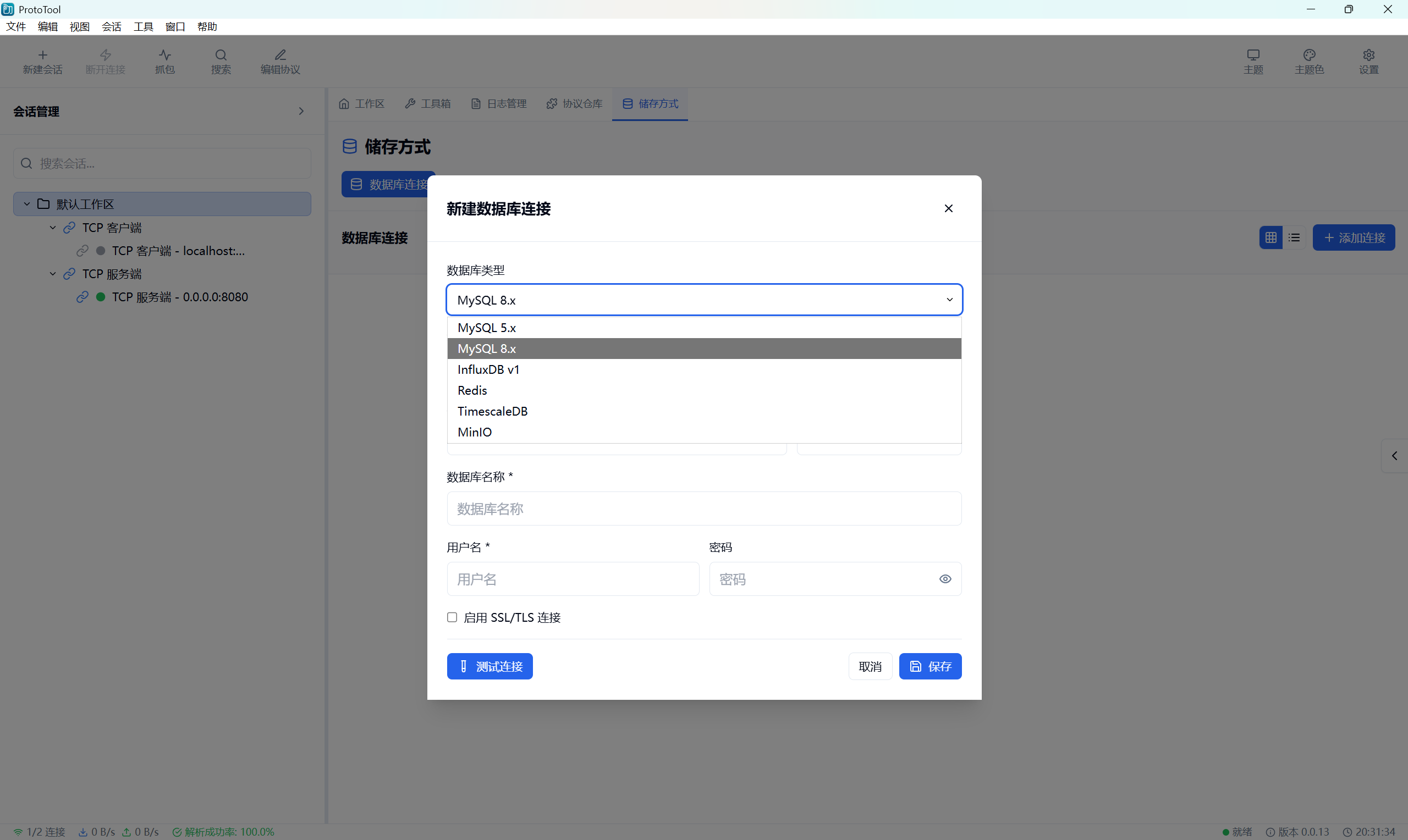
Storage Monitor Interface

Storage Monitor

Real-time monitoring of data storage status, supporting multiple databases like MySQL, Redis, InfluxDB.

Screenshot coming soon
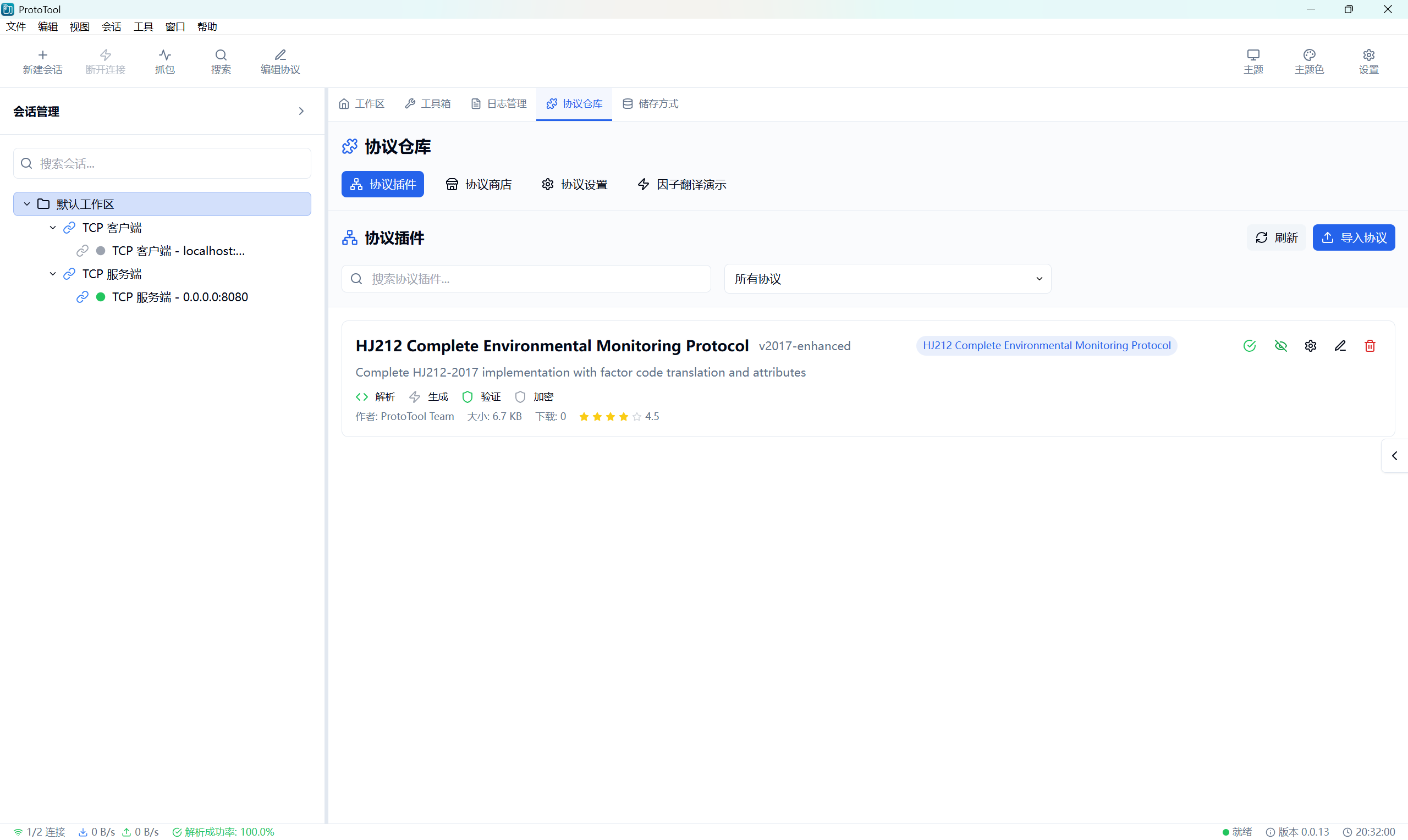
Factor Translator Interface

Factor Translator

HJ212 environmental monitoring factor code intelligent translation with custom factor code table management.

💡 Tip: Screenshots are being prepared, stay tuned for more interface displays

Workflow

Complete Cycle from Connection to Delivery

ProtoTool leverages rule parsing, plugin extensions, and data storage capabilities to help teams quickly complete every step from connection, debugging to delivery.

View Detailed Roadmap
01

Connect

Connect to target services or devices, automatically identify protocol attributes and generate debugging templates.

02

Orchestrate

Use visual forms or DSL to define requests, assertions, and replay rhythms.

03

Collaborate

Record integration process in real-time, insert comments, AI assistance, and automation scripts.

04

Deliver

Export reports or CI steps, accumulate experience as team assets.

Release notes

Release v0.0.13

Published on Oct 4, 2025

View on GitHub Release

Version 0.0.13

发布日期:2025年10月04日 | Release Date: October 4, 2025

🚀 主要新功能 | Major New Features

📝 协议编辑器与仓库系统 | Protocol Editor & Repository System

  • 协议编辑器功能: 新增完整的协议编辑器,支持 KPT 1.1 规范
    • Protocol Editor Feature: Added complete protocol editor with KPT 1.1 specification support
  • 协议仓库管理: 实现协议导入、导出、列举和删除功能
    • Protocol Repository Management: Implemented protocol import, export, list, and delete functionality
  • KPT 1.1 规范支持: 升级 HJ212 协议以支持 KPT 1.1 规范
    • KPT 1.1 Specification Support: Upgraded HJ212 protocol to support KPT 1.1 specification
  • 协议内容加载与编辑: 支持协议内容的实时加载和编辑
    • Protocol Content Loading & Editing: Support real-time loading and editing of protocol content

🔄 文件导出功能优化 | File Export Functionality Optimization

  • 原生文件对话框: 使用 Tauri 后端实现原生文件保存对话框
    • Native File Dialog: Implemented native file save dialog using Tauri backend
  • 跨平台兼容: 支持 Windows、macOS 和 Linux 的文件导出
    • Cross-Platform Compatibility: Support file export on Windows, macOS, and Linux
  • 文件格式过滤: 支持 .kpt 和 .txt 文件格式过滤
    • File Format Filtering: Support .kpt and .txt file format filtering
  • 错误处理优化: 改进导出错误提示和用户反馈
    • Error Handling Optimization: Improved export error messages and user feedback

🔍 因子代码翻译功能 | Factor Code Translation Feature

  • 因子代码解析: 实现环境监测因子代码的解析和翻译
    • Factor Code Parsing: Implemented parsing and translation of environmental monitoring factor codes
  • HJ212 消息解析: 集成 HJ212 消息解析与因子翻译
    • HJ212 Message Parsing: Integrated HJ212 message parsing with factor translation
  • 因子定义管理: 支持因子代码定义的管理和查询
    • Factor Definition Management: Support management and query of factor code definitions

📊 日志系统增强 | Logging System Enhancement

  • 后端日志管理: 实现完整的后端日志管理系统
    • Backend Log Management: Implemented complete backend log management system
  • 日志分类过滤: 支持按类别、级别、会话等多维度过滤
    • Log Category Filtering: Support filtering by category, level, session, and more
  • 日志导出功能: 支持 JSON、CSV 和 Markdown 格式导出
    • Log Export Feature: Support export in JSON, CSV, and Markdown formats
  • 日志详情展示: 显示客户端 ID、协议、数据大小等详细信息
    • Log Details Display: Show client ID, protocol, data size, and other details

🗄️ 存储方式管理 | Storage Management

  • 数据库连接管理: 支持 MySQL、Redis、InfluxDB 等多种数据库
    • Database Connection Management: Support MySQL, Redis, InfluxDB, and more
  • 存储规则配置: 实现存储规则的增删改查功能
    • Storage Rule Configuration: Implemented CRUD operations for storage rules
  • 连接测试功能: 支持数据库连接测试和错误诊断
    • Connection Test Feature: Support database connection testing and error diagnosis
  • 存储监控: 实现存储监控页面和真实数据加载
    • Storage Monitoring: Implemented storage monitoring page with real data loading

🎨 用户界面改进 | UI/UX Improvements

🖼️ 协议编辑器界面 | Protocol Editor Interface

  • 统一消息弹窗: 实现统一的消息提示和确认对话框
    • Unified Message Modal: Implemented unified message prompts and confirmation dialogs
  • 导入导出优化: 优化协议导入导出的用户体验
    • Import/Export Optimization: Optimized user experience for protocol import/export
  • 预览显示: 添加协议内容预览功能
    • Preview Display: Added protocol content preview feature
  • 中文按钮: 所有按钮使用中文显示,提升本地化体验
    • Chinese Buttons: All buttons display in Chinese for better localization

📋 协议仓库界面 | Protocol Repository Interface

  • 协议列表管理: 优化协议列表的显示和操作
    • Protocol List Management: Optimized protocol list display and operations
  • 协议配置对话框: 添加协议配置对话框功能
    • Protocol Configuration Dialog: Added protocol configuration dialog feature
  • 按钮组件增强: 引入按钮组件以增强协议插件管理器
    • Button Component Enhancement: Introduced button components to enhance protocol plugin manager

🎯 工作区界面优化 | Workspace Interface Optimization

  • 协议类型标签: 添加协议类型标签并优化会话表格显示
    • Protocol Type Tags: Added protocol type tags and optimized session table display
  • 协议图标更新: 更新协议图标和表格列宽保护
    • Protocol Icon Update: Updated protocol icons and table column width protection
  • 会话过滤: 支持通过 URL 参数查看特定会话日志
    • Session Filtering: Support viewing specific session logs via URL parameters

🔧 技术改进 | Technical Improvements

🏗️ 架构优化 | Architecture Optimization

  • Tauri API 重构: 重构 Tauri API 调用逻辑以支持 v2 版本
    • Tauri API Refactoring: Refactored Tauri API call logic to support v2
  • 全局缓存重构: 使用 OnceLock 替代静态可变全局变量
    • Global Cache Refactoring: Used OnceLock to replace static mutable global variables
  • 解析器注册表: 扩展协议解析器注册表以支持协议仓库操作
    • Parser Registry: Extended protocol parser registry to support repository operations

🛡️ 错误处理和恢复 | Error Handling & Recovery

  • 文件保存错误处理: 实现文件保存失败时的优雅错误处理
    • File Save Error Handling: Implemented graceful error handling for file save failures
  • 导出错误提示: 改进导出错误提示,显示具体错误内容
    • Export Error Messages: Improved export error messages to show specific error details
  • 连接错误诊断: 增强数据库连接错误的诊断和提示
    • Connection Error Diagnosis: Enhanced database connection error diagnosis and prompts

📦 依赖管理 | Dependency Management

  • rfd 文件对话框: 添加 rfd crate 用于原生文件对话框
    • rfd File Dialog: Added rfd crate for native file dialogs
  • Tauri 命令扩展: 新增多个 Tauri 命令用于协议管理和文件操作
    • Tauri Command Extension: Added multiple Tauri commands for protocol management and file operations

🐛 Bug 修复 | Bug Fixes

🔌 协议编辑器修复 | Protocol Editor Fixes

  • 导出功能修复: 修复协议编辑器和协议仓库的导出功能
    • Export Function Fix: Fixed export functionality in protocol editor and repository
  • 环境检测移除: 移除冗余的 Tauri 环境检测逻辑
    • Environment Detection Removal: Removed redundant Tauri environment detection logic
  • 模块导入修复: 统一动态导入模块方式以避免 Vite 静态分析问题
    • Module Import Fix: Unified dynamic module import to avoid Vite static analysis issues

🌐 网络功能修复 | Network Function Fixes

  • UDP 消息流优化: 优化 UDP 客户端消息流显示和过滤逻辑
    • UDP Message Flow Optimization: Optimized UDP client message flow display and filtering logic
  • TCP 连接处理: 优化 TCP 客户端断开连接处理逻辑
    • TCP Connection Handling: Optimized TCP client disconnect handling logic
  • 客户端连接事件: 优化客户端连接事件处理与同步方法
    • Client Connection Events: Optimized client connection event handling and sync methods

🗂️ 存储功能修复 | Storage Function Fixes

  • 数据库连接测试: 增强数据库连接测试功能和错误消息
    • Database Connection Test: Enhanced database connection test feature and error messages
  • 存储规则验证: 实现存储规则表单验证和错误提示
    • Storage Rule Validation: Implemented storage rule form validation and error prompts

📦 平台支持 | Platform Support

  • Windows: MSI 安装包、NSIS 安装包和便携版
    • 支持 x86 (32位) 和 x64 (64位) 架构
  • macOS: DMG 安装包
    • Intel x64 和 Apple Silicon (ARM64) 分别打包
  • Linux: AppImage、DEB 和 RPM 包
    • 支持 x86_64 和 ARM64 架构

📝 安装说明 | Installation Notes

  • 从下方的发布资源中下载适合您系统的安装包
    • Download the appropriate package for your platform from the release assets
  • Windows 用户推荐使用 MSI 安装包,也可选择便携版
    • Windows users can choose between MSI installer (recommended) or portable versions
  • macOS 用户请根据处理器架构选择对应的安装包
    • macOS users should download the package matching their processor architecture
  • Linux 用户可根据发行版选择 DEB、RPM 或通用的 AppImage 格式
    • Linux users can install the appropriate package for their system architecture

🔗 链接 | Links

📊 版本统计 | Version Statistics

  • 新增功能: 15+ 个主要功能模块 | New Features: 15+ major feature modules
  • 修复问题: 10+ 个关键 Bug 修复 | Bug Fixes: 10+ critical bug fixes
  • 代码提交: 50+ 次提交 | Commits: 50+ commits
  • 文件修改: 100+ 个文件更新 | Files Modified: 100+ files updated
  • 代码改进: 5000+ 行新增和优化代码 | Code Improvements: 5000+ lines of new and optimized code

🎯 重点改进 | Key Improvements

  1. 协议管理系统: 完整的协议编辑、导入、导出和管理功能
    • Protocol Management System: Complete protocol editing, import, export, and management
  2. 文件操作优化: 使用原生文件对话框,提升用户体验
    • File Operation Optimization: Native file dialogs for better user experience
  3. 日志系统完善: 全面的日志记录、过滤和导出功能
    • Logging System Enhancement: Comprehensive logging, filtering, and export features
  4. 存储管理: 多数据库支持和存储规则配置
    • Storage Management: Multi-database support and storage rule configuration
  5. 因子翻译: 环境监测因子代码的智能解析和翻译
    • Factor Translation: Intelligent parsing and translation of environmental monitoring factor codes

此版本专注于协议管理和文件操作的全面提升,通过完整的协议编辑器、原生文件对话框和增强的日志系统,为用户提供更强大和便捷的协议调试体验。这是一个重要的功能增强版本。

This release focuses on comprehensive improvements to protocol management and file operations. Through a complete protocol editor, native file dialogs, and enhanced logging system, it provides users with a more powerful and convenient protocol debugging experience. This is an important feature enhancement release.

Downloads

Download ProtoTool v0.0.13

File list is fetched in real-time from GitHub Release. We automatically recommend the most suitable installer for your system.

Release Date · Oct 4, 2025

Windows

Supports MSI and NSIS installers, available in x86 (32-bit) and x64 (64-bit) architectures with Chinese and English interfaces.

  • ProtoTool_0.0.13_x64-setup.exe
    Size · 4.9 MBDownloads · 3
    Download Now
  • ProtoTool_0.0.13_x64_en-US.msi
    Size · 7.0 MBDownloads · 2
    Download Now
  • ProtoTool_0.0.13_x64_zh-CN.msi
    Size · 7.0 MBDownloads · 0
    Download NowSuggested for Installation
  • ProtoTool_0.0.13_x86-setup.exe
    Size · 4.3 MBDownloads · 0
    Download Now
  • ProtoTool_0.0.13_x86_en-US.msi
    Size · 6.1 MBDownloads · 0
    Download Now
  • ProtoTool_0.0.13_x86_zh-CN.msi
    Size · 6.1 MBDownloads · 0
    Download Now

macOS

Provides dual-version DMG installers for Intel x64 and Apple Silicon (ARM64).

  • ProtoTool_0.0.13_aarch64.dmg
    Size · 9.9 MBDownloads · 0
    Download NowSuggested for Installation
  • ProtoTool_0.0.13_x64.dmg
    Size · 10.1 MBDownloads · 0
    Download Now

Linux

Offers multiple distribution formats including AppImage, DEB, RPM for x86_64 and ARM64 architectures.

  • ProtoTool-0.0.13-1.x86_64.rpm
    Size · 9.8 MBDownloads · 0
    Download Now
  • ProtoTool_0.0.13_amd64.AppImage
    Size · 83.7 MBDownloads · 0
    Download NowSuggested for Installation
  • ProtoTool_0.0.13_amd64.deb
    Size · 9.8 MBDownloads · 0
    Download Now

Use cases

Multi-Industry Implementation Cases

The following scenarios come from real feedback and planning from ProtoTool community users, helping teams leverage the protocol debugging platform value in different business environments.

IoT Operations

Batch verify gateway and terminal device status, monitor heartbeat, QoS and load policies, quickly generate integration daily reports.

Financial Real-Time Quotes

Track FIX, WebSocket quote chains, combine specification parsing and data desensitization to ensure compliant debugging.

Edge Computing Deployment

Deploy protocol probes on edge nodes, remotely insight network fluctuations and output automated analysis reports.

Release History

  1. Release v0.0.13

    Oct 4, 2025

    View Details
  2. Release v0.0.12

    Sep 22, 2025

    View Details
  3. Release v0.0.11

    Sep 17, 2025

    View Details
  4. Release v0.0.10

    Sep 13, 2025

    View Details

Join ProtoTool Community, Build Your Protocol Debugging Workstation

Schedule a 30-minute in-depth demo to learn how to improve cross-team collaboration efficiency through a unified debugging platform and accumulate experience as standardized assets.